Posts

CSS Flexbox, AMP, and Bootstrap 4: Mastering the Foundations of Modern Web Development

Image
A Fantastic Year of Learning: Creative Technocrayts' 2018 Rewind Wow!! 2018 was a fantastic foundational year for us, Creative Technocrayts. The skills we mastered that year—like implementing **advanced CSS layout techniques (Flexbox)**, pioneering **Core Web Vitals concepts** via Google’s AMP, and streamlining UI design with **Font Awesome 5**—are still **critical for modern high-performance web development today.** We have discussed a lot, thanks to the constant support from the community. We have received both positive feedback and negative criticism as well. Keeping that in mind, we strive to improve and learn more and give back to the community. 2018 showed tremendous increasing readership from the Google+ community and Facebook page, apart from Twitter and LinkedIn, and we are so happy about that. Thank you guys :) It's time for us to look back at this awesome year, 2018!!! Daily UI ...

Daily UI practice #1 - Input range slider and populating value in script

Image
Daily UI practice Recently I had some time so checked for latest updates in design from awwwards.com I wanted to practice UI for the day. So I picked up a site from there. The reason I picked up that is i) I wanted to learn something new ii) I wanted to do something which I haven’t done before So the exercise was about, Creating a range slider and getting the value Added box-shadow to jumbotron component. Now placing input range elements inside the component, Following bootstrap 4 documentation I got the above screen as it looked like in bootstrap website. I can’t proceed further as I didn’t have any other elements to style. Then I read few tutorials from css-tricks.com What is Shadow DOM? Well, we all know that, when a HTML page is loaded in a browser DOM (Document Object Model) is created. Likewise browsers have capability to create sub tree to the already created DOM elements.   Now we have got two components and customize the styles. They are 1. Trac...

jQuery practice #3 - DOM manipulation

Image
jQuery is a Javascript framework. When do we use Javascript, jQuery, jQuery UI DOM Manipulation in jQuery What jQuery does? jQuery is a JavaScript library that can: Access parts of a page Modify the appearance of the page Alter the content of the page Respond to user interaction with the page Add animation to a page Manipulating DOM with jQuery methods 1. To insert new elements inside every matched element, use: .append() .appendTo() .prependTo() .prepend() Example for .prepend() in jQuery HTML: <div class="productsContent one-box"> <div class="box"> <h4> Loreum ipsum1</h4> <p> Neque porro quisquam est qui dolorem ipsum quia dolor sit amet, consectetur, adipisci velit... </p> </div> </div> Prepending an element using jQuery: $('.productsContent').prepend('November, 2018'); New DOM: $(...

How to solve browser compatibility issues in websites?

Image
Websites we develop should always ensure better user experience keep in my mind the tough competition in the market by contemporary players How to solve browser issues in website How our website or web applications looks in different browsers and in different platforms matters the most. We are seeing increase in range of browsers and we may not know from which browser users visit our site. Every browsers have their own way of being an ideal browsers and they have their own features. Making our functions and UI across all the browsers should follow certain guidelines. By ensuring browser compatibility in our SDLC, it would be a safe game to play instead of going about things in the final end. To solve common browser compatible inconsistencies, we are discussing few effective points here. Browser compatibility for modern browsers Keeping in mind, the cost and time constraints, making sure our websites work for Chrome, M...

CSS Flexbox justify-content Property: How to Use space-between, space-around, and space-evenly for Horizontal Alignment

Image
Flexbox CSS justify-content:space-* In modern web design, Flexbox has become one of the most powerful layout tools in CSS. The justify-content property plays a crucial role in aligning and distributing space between items within a container, especially in horizontal layouts. In this article, we'll explore how to use justify-content with various values like space-between, space-around, and space-evenly to achieve optimal alignment for your web designs. Flexbox CSS justify-content: space-* Flexbox layout and its properties are a set of properties which helps to align flex-items in a container. As we have discussed in detail in our previous articles: Flexbox is a set of properties. It helps to align grid elements in a container in many ways. It also helps to realign the way elements are arranged on mobile or responsive screens without writing too much code. What is justify-content in CSS Flexbox? The justify-content ...

What is the difference between Javascript, jQuery, jQuery UI, jQuery mobile?

Image
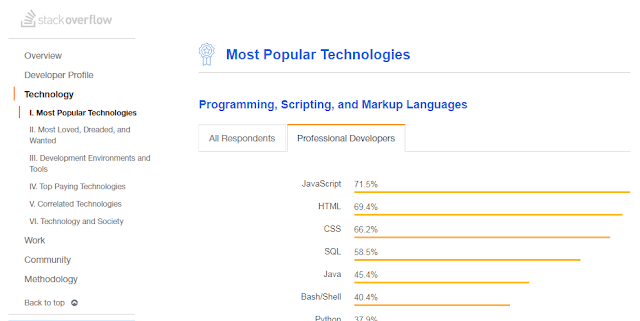
What is the difference between Javascript, JQuery, JQuery UI, JQuery mobile? Javascript Javascript is a programming language with its own syntax, functions, data structures and loops. Javascript is the most popular language used in web development. According to Stack overflow 2018 survey results Javascript is the most popular programming language. It has become an ubiquitous in web development. What is the difference between JQuery and Javascript JQuery is a Javascript library. It is built on top of Javascript and makes use of its functions. Jquery carries the motto “write less; do more”. JQuery is an extensive library making use of Javascript features and function within its library. JQuery framework is useful for 1) Manipulating DOM elements 2) CSS Selectors manipulation 3) Handling AJAX data for communicating with servers perform actions on specific events. 4) AJAX communication with servers 5) Animation effects 6) HTTP requests JQuery is said to have poor backwar...

Background image and gradient to the same div in CSS

Image
This article deals with an example to demonstrate how to background-color, background-image and background shorthand property in CSS. You may read this article How to add box-shadow in CSS? How to add Background image to the div     .div1{ background-image: url(../images/bg.jpg); } How to add Background color to the div .div2{ background-color: #0085c2; }     How to add background image and background gradient to the same div? .div2{ background: linear-gradient( rgba(253,29,29,0.6), rgba(252,176,69,0.6) ),url(../images/slide2.jpg); } Instead of background-image or background-color property we have to use background property which is the shorthand rule. Background-gradient and image are separated by comma. The resultant output Also read next article - Is your site mobile friendly?