Posts

Showing posts with the label Javascript

CSS Flexbox, AMP, and Bootstrap 4: Mastering the Foundations of Modern Web Development

Image
A Fantastic Year of Learning: Creative Technocrayts' 2018 Rewind Wow!! 2018 was a fantastic foundational year for us, Creative Technocrayts. The skills we mastered that year—like implementing **advanced CSS layout techniques (Flexbox)**, pioneering **Core Web Vitals concepts** via Google’s AMP, and streamlining UI design with **Font Awesome 5**—are still **critical for modern high-performance web development today.** We have discussed a lot, thanks to the constant support from the community. We have received both positive feedback and negative criticism as well. Keeping that in mind, we strive to improve and learn more and give back to the community. 2018 showed tremendous increasing readership from the Google+ community and Facebook page, apart from Twitter and LinkedIn, and we are so happy about that. Thank you guys :) It's time for us to look back at this awesome year, 2018!!! Daily UI ...
What is the difference between Javascript, jQuery, jQuery UI, jQuery mobile?

Image
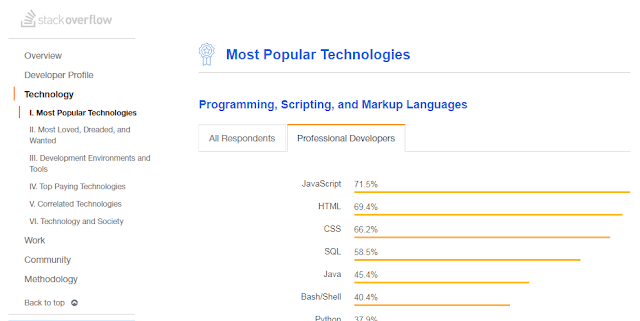
What is the difference between Javascript, JQuery, JQuery UI, JQuery mobile? Javascript Javascript is a programming language with its own syntax, functions, data structures and loops. Javascript is the most popular language used in web development. According to Stack overflow 2018 survey results Javascript is the most popular programming language. It has become an ubiquitous in web development. What is the difference between JQuery and Javascript JQuery is a Javascript library. It is built on top of Javascript and makes use of its functions. Jquery carries the motto “write less; do more”. JQuery is an extensive library making use of Javascript features and function within its library. JQuery framework is useful for 1) Manipulating DOM elements 2) CSS Selectors manipulation 3) Handling AJAX data for communicating with servers perform actions on specific events. 4) AJAX communication with servers 5) Animation effects 6) HTTP requests JQuery is said to have poor backwar...

Google's Accelerated Mobile Pages (AMP) HTML

Image
You may read the previous article What is Responsive web design? Like Mobile usability , mobile performance also matters when it comes to appear first in Google search results. Page speed is important Google has announced that from July 2018, Page speed as mobile ranking factor. The announcement has been come in advance so that website owners can revamp their sites accordingly and make sure that their website is performing well. Google business logic behind AMP There are many ad-blockers in usage and many potential players switch from website to web apps. So web advertising revenue of Google might be at threat. So AMP is devised so ads are integral part of the HTML itself. Nowadays, people use apps to search content and apps are comparatively performing faster to web . Google’s main business is based on crawling and indexing of websites and searching content from web and producing it in a readable format. It is also noted that web pages have a drawback of loading speed. Since ap...

Datatables.net - Plugin options

Image
DataTables jQuery Plugin Options – Complete Guide In Part I of this series, we introduced the basics of the DataTables.net jQuery plugin . The DataTables jQuery plugin provides a rich set of configuration options for sorting, paging, search, and responsive layouts. Let’s see how you can utilize these options efficiently. CDN Links for DataTables Add the following CSS and JS files to your project using CDN links: Stylesheet References https://cdn.datatables.net/1.10.16/css/jquery.dataTables.min.css https://cdn.datatables.net/responsive/2.2.1/css/responsive.dataTables.min.css Script References https://cdn.datatables.net/1.10.16/js/jquery.dataTables.min.js https://cdn.datatables.net/responsive/2.2.1/css/responsive.dataTables.min.css Disable All Options $("#example").dataTable({ paging: false, searching: false, info: false }); To display “Show entries” dropdown at the bottom of the data table $('.promo-prici...

How to debug effectively while using jQuery

Image
Common jQuery Errors and How to Resolve Them jQuery is a JavaScript framework used for client-side scripting of HTML. jQuery is used for: DOM manipulation Event Handling Animation jQuery is a popular framework with a large community of developers using it, and many plugins have been developed using it. While working using jQuery in our projects, we may encounter the following errors in common: 1) Uncaught TypeError: Cannot read property 'xxx' of undefined 2) Uncaught TypeError: 'xxx' is not a function 3) SyntaxError: syntax error 4) 404 Errors 5) Conflict errors You may also read: Datatables-plugin options Ways to handle errors in jQuery Check whether jQuery is loaded. if (typeof jQuery == 'undefined') { // jQuery IS NOT loaded, do stu...

How to initialize Datatable plugin?

Image
How to initialize Datatable plugin? Datatables.net is a sophisticated plug-in built on the jQuery JavaScript library. It provides enhanced functionality to normal HTML tables, offering built-in search, pagination, and sorting features. Download & Assets The asset files can be downloaded via the following methods: Official Website: datatables.net/download/index CDN Links: cdn.datatables.net Basic Implementation of Datatable Write the basic markup of the table with data. Add a unique ID or class name to the table. Include all the assets. As Datatables.net is built on jQuery , ensure that jQuery is loaded before the DataTables script. <table class="dashboard-table" id="example"> <thead> <tr> <th>Sites</th> <th>Followers</th> <th>R...

Javascript window events

Image
onbeforeunload function in JavaScript | Creative Technocrayts onbeforeunload function in JavaScript When you have filled up a form in a web page and if you close the page before submitting it, you may get a message "Are you sure to leave this page?" Such customized messages are examples of window events onbeforeunload . The onbeforeunload event is fired when the document unloads its resources. You may notice the document is still visible and the event can be cancelled. onbeforeunload event is assigned to the <body> element. Various mobile user agents ignore the event. HTML Code Example You can implement the onbeforeunload event like this: <body onbeforeunload="return myFunction()"> Other tags </body> JavaScript Code Example Here’s an example of the JavaScript function to show the prompt: function myFunction(){ return "Your mes...
