Posts

What is the difference between Javascript, jQuery, jQuery UI, jQuery mobile?
Image
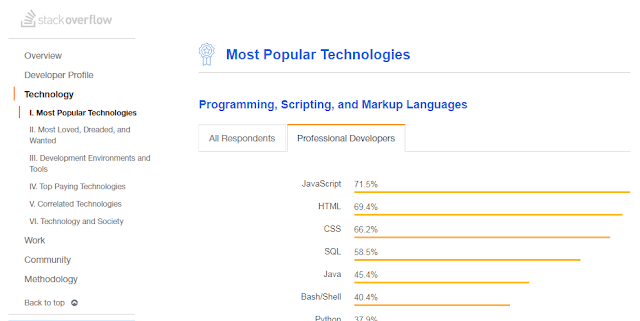
What is the difference between Javascript, JQuery, JQuery UI, JQuery mobile? Javascript Javascript is a programming language with its own syntax, functions, data structures and loops. Javascript is the most popular language used in web development. According to Stack overflow 2018 survey results Javascript is the most popular programming language. It has become an ubiquitous in web development. What is the difference between JQuery and Javascript JQuery is a Javascript library. It is built on top of Javascript and makes use of its functions. Jquery carries the motto “write less; do more”. JQuery is an extensive library making use of Javascript features and function within its library. JQuery framework is useful for 1) Manipulating DOM elements 2) CSS Selectors manipulation 3) Handling AJAX data for communicating with servers perform actions on specific events. 4) AJAX communication with servers 5) Animation effects 6) HTTP requests JQuery is said to have poor backwar...

Background image and gradient to the same div in CSS

Image
This article deals with an example to demonstrate how to background-color, background-image and background shorthand property in CSS. You may read this article How to add box-shadow in CSS? How to add Background image to the div     .div1{ background-image: url(../images/bg.jpg); } How to add Background color to the div .div2{ background-color: #0085c2; }     How to add background image and background gradient to the same div? .div2{ background: linear-gradient( rgba(253,29,29,0.6), rgba(252,176,69,0.6) ),url(../images/slide2.jpg); } Instead of background-image or background-color property we have to use background property which is the shorthand rule. Background-gradient and image are separated by comma. The resultant output Also read next article - Is your site mobile friendly?

Boostrap 4 menu align right side in navbar

Image
Boostrap 4 menu align right side in navbar In Boostrap 3 menubar, .navbar-right class is used to bring the menu to the right side.Now .navbar-right class is deprecated. How to align menu to right side using Bootstrap 4 As we already discussed that Bootstrap 4 is built on Flexbox layout , there is change in implementation accordingly. Following code-snippet will highlight the changes in HTML code <nav class="navbar navbar-expand-lg navbar-light fixed-top justify-content-between"> <a class="navbar-brand" href="#">Cafe Express</a> <button class="navbar-toggler" type="button" data-toggle="collapse" data-target="#navbarSupportedContent" aria-controls="navbarSupportedContent" aria-expanded="false" aria-label="Toggle navigation"> <span class="navbar-toggler-icon"></span> </button> <div class=...

Font Awesome 5.1

Image
Last time we had a very detailed discussion on Font Awesome 5 and how it stands different from Font Awesome 4.There were three methods to add Font Awesome 5 into our project. Font Awesome 5 can also be downloaded as Web Fonts and used in our local.      style="display:block"      data-ad-format="fluid"      data-ad-layout-key="-bw+m-2t-1d4+2yh"      data-ad-client="ca-pub-9980434921650127"      data-ad-slot="6489306790"> Now Font awesome, has got its new release FontAwesome 5.1.0 with three more categories, 1. Travel 2. Design 3. Emoji We felt awesome after seeing release of Font awesome 5.1 Emoji icons and can’t wait to use in our next project. Font awesome continues to stand apart with large icon base with much better compatibility. All Javascript component packages are now stable. Font awesome 5.1 can be used for React, Angular, Vue and Ember projects. Know the implementation of Font Aweso...

Mastering CSS Flexbox: How to Use the order Property for Flexible Layouts

Image
CSS Flexbox Order CSS Flexbox is a powerful tool for creating responsive web layouts. We have discussed CSS Flexbox layout and its related properties with examples in our previous post. In this article, we’ll focus on the order property in Flexbox, which allows you to rearrange the order of elements without changing the source code. This makes Flexbox even more versatile for modern web design. Right from the initial stages, ordering the elements has been quite tricky. CSS Flexbox ordering emphasizes how useful it is for responsive design. For example, when designing a mobile version of a website, you might want the sidebar to appear below the content instead of beside it. Using the order property allows you to achieve this reordering without modifying the HTML structure. When attempting to visually order the elements differently from the source code order, the flexbox order of the elements is very useful. Cross Browser compatibili...

A Complete Guide to CSS Flexbox: Layout, Alignment, and Flex Properties

Image
CSS Flexbox Layout – Complete Guide with Examples Before diving in, make sure to read our guide on CSS Display Property . Traditionally, web layouts like the above were created using CSS floats . However, with CSS Flexbox , you can achieve the same results more efficiently and responsively. Why Use CSS Flexbox? ✅ Flexbox is a modern alternative to CSS floats and table layouts. ✅ It gives control over alignment, direction, order, and size of elements within a container. Let’s explore each concept of Flexbox step by step. Basic Components of CSS Flexbox a) Flex Container b) Flex Items Browser Compatibility CSS Flexbox is supported by all modern browsers including Chrome, Firefox, Safari, iOS Safari, and Opera. Internet Explorer 11 supports an older version of the specification with some limitations. ...

Google's Accelerated Mobile Pages (AMP) HTML

Image
You may read the previous article What is Responsive web design? Like Mobile usability , mobile performance also matters when it comes to appear first in Google search results. Page speed is important Google has announced that from July 2018, Page speed as mobile ranking factor. The announcement has been come in advance so that website owners can revamp their sites accordingly and make sure that their website is performing well. Google business logic behind AMP There are many ad-blockers in usage and many potential players switch from website to web apps. So web advertising revenue of Google might be at threat. So AMP is devised so ads are integral part of the HTML itself. Nowadays, people use apps to search content and apps are comparatively performing faster to web . Google’s main business is based on crawling and indexing of websites and searching content from web and producing it in a readable format. It is also noted that web pages have a drawback of loading speed. Since ap...